A record of crawling Taobao/Tmall review data
I've recently gotten into data mining and machine learning, and to do data analysis you first need data. For ordinary folks like us, the cheapest way to get data is probably to crawl it from the web. This post documents my full process of crawling reviews for a particular product on Tmall; shops on Taobao work similarly, so I won't repeat that. The focus here is on analyzing the page structure and implementing a simple, convenient scraper in Python.
The tools I used are as follows:
Python 3 — an extremely convenient programming language. I chose the 3.x version because it handles Chinese text more gracefully.
Pandas — a Python add-on library used for data wrangling.
IE 11 — for analyzing the page request process (other similar traffic-monitoring tools work too).
The rest are requests and re, both of which are built-in Python libraries.
Example page (a certain Midea water heater): http://detail.tmall.com/item.htm?id=41464129793more
Where are the reviews?
To scrape review data, you first need to find out where the reviews actually live. Open the URL above, then view the page source, and you'll find there are no reviews in it at all! So where exactly is the review data? It turns out Tmall uses ajax-based encryption, loading the review data from a separate page.
This is where IE 11 comes in handy (of course you could use another traffic-monitoring tool instead). Before using it, open the URL above, wait for the page to load, clear IE 11's cache and history, then press F12. You'll see the following interface:
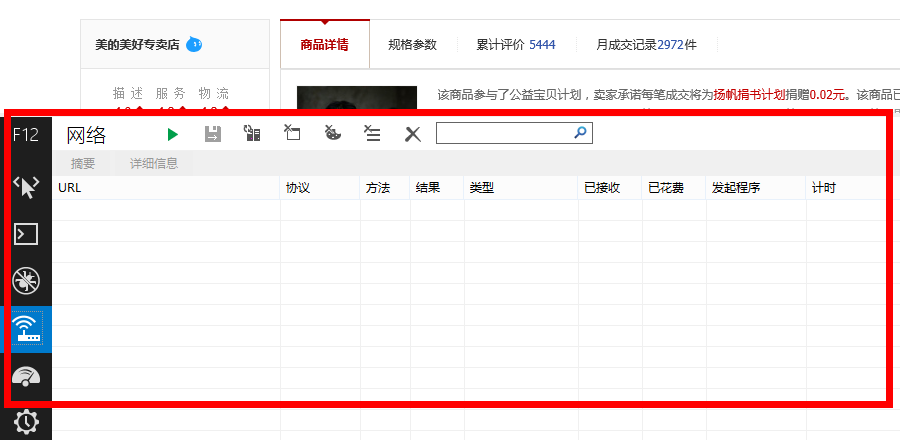 F12
F12
Now click the green triangle button to start capturing network traffic (or just press F5), then click "Cumulative reviews" on the Tmall page:
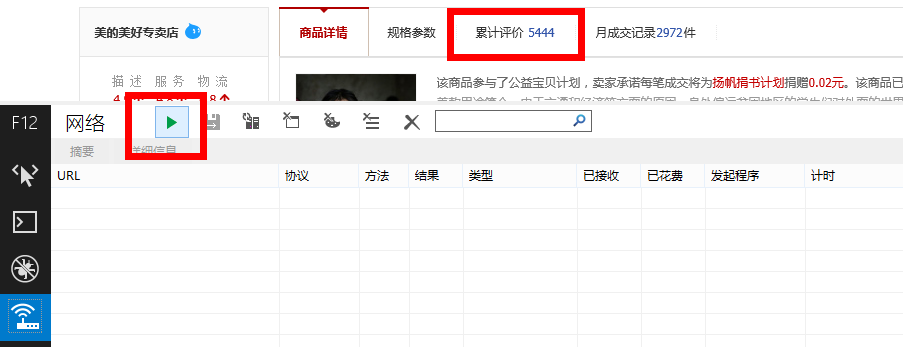 Capture
You'll get the following result:
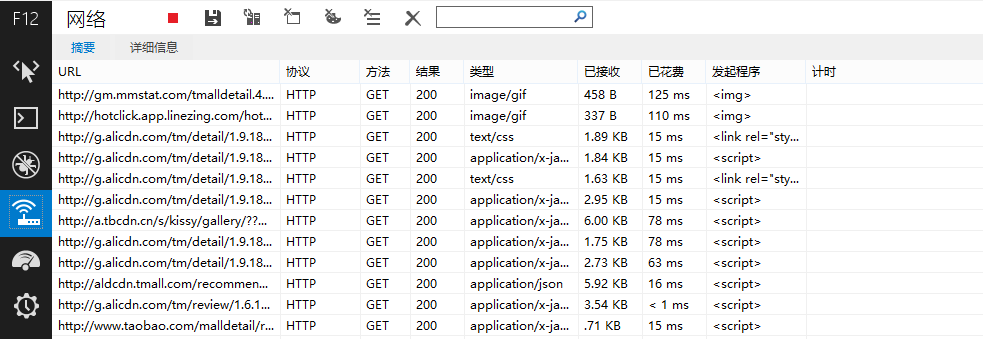 Capture result
A bunch of URLs show up under URL, and the review data is hidden among them! We mainly want to pay attention to URLs of type "text/html" or "application/json." After some testing, I found that Tmall's reviews live at the following URL:
http://rate.tmall.com/list_detail_rate.htm?itemId=41464129793&spuId=296980116&sellerId=1652490016&order=3¤tPage=1&append=0&content=1&tagId=&posi=&picture=&ua=166UW5TcyMNYQwiAiwVQX1EeUR5RH5Cd0xiNGI%3D%7CUm5Ockt1SHxBe0B0SXNOdCI%3D%7CU2xMHDJxPk82UjVOI1h2VngRd1snQSJEI107F2gFfgRlAmRKakQYeR9zFGoQPmg%2B%7CVGhXd1llXGJfa1ZsV2NeZFljVGlLdUt2TXFOc0tyT3pHe0Z6QHlXAQ%3D%3D%7CVWldfS0SMgo3FysUNBonHyMdNwI4HStHNkVrPWs%3D%7CVmhIGCIWNgsrFykQJAQ6DzQAIBwiGSICOAM2FioULxQ0DjEEUgQ%3D%7CV25OHjAePgA0DCwQKRYsDDgHPAdRBw%3D%3D%7CWGFBET8RMQ04ACAcJR0iAjYDNwtdCw%3D%3D%7CWWBAED5%2BKmIZcBZ6MUwxSmREfUl2VmpSbVR0SHVLcU4YTg%3D%3D%7CWmFBET9aIgwsECoKNxcrFysSL3kv%7CW2BAED5bIw0tESQEOBgkGCEfI3Uj%7CXGVFFTsVNQw2AiIeJxMoCDQIMwg9az0%3D%7CXWZGFjhdJQsrECgINhYqFiwRL3kv%7CXmdHFzkXNws3DS0RLxciAj4BPAY%2BaD4%3D%7CX2ZGFjgWNgo1ASEdIxsjAz8ANQE1YzU%3D%7CQHtbCyVAOBY2Aj4eIwM%2FAToONGI0%7CQXhYCCYIKBMqFzcLMwY%2FHyMdKRItey0%3D%7CQntbCyULKxQgGDgEPQg8HCAZIxoveS8%3D%7CQ3paCiQKKhYoFDQIMggwEC8SJh8idCI%3D%7CRH1dDSMNLRIrFTUJMw82FikWKxUueC4%3D%7CRX5eDiAOLhItEzMOLhIuFy4VKH4o%7CRn5eDiAOLn5GeEdnW2VeYjQUKQknCSkQKRIrFyN1Iw%3D%3D%7CR35Dfl5jQ3xcYFllRXtDeVlgQHxBYVV1QGBfZUV6QWFZeUZ%2FX2FBfl5hXX1AYEF9XXxDY0J8XGBbe0IU&isg=B2E8ACFC7C2F2CB185668041148A7DAA&_ksTS=1430908138129_1993&callback=jsonp1994
Feeling a bit dizzy from the length? Don't worry, with a little analysis you'll find it can be trimmed down to just this:
http://rate.tmall.com/list_detail_rate.htm?itemId=
41464129793
&sellerId=
1652490016
¤tPage=
1
Turns out Tmall is actually quite generous — the review page URL follows a clear pattern (unlike JD.com, whose URLs are completely random and unpredictable). Here itemId is the product ID, sellerid is the seller ID, and currentPage is the page number.
How do we crawl it?
After some effort, we've finally found where the reviews live. Next comes the actual crawling — how do we do it? First let's analyze the page structure.
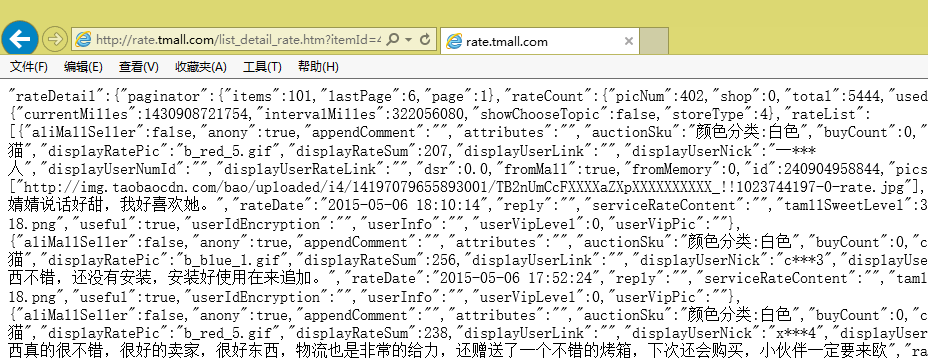 Page format
We can see the page data is very well-structured. In fact, it's in a lightweight data-interchange format called JSON (you can search for it if you're not familiar). But it's not quite standard JSON — actually, only the content inside the square brackets [] on the page is valid JSON.
Now let's start our scraping. I use Python's requests library to fetch the page. In Python, enter the following in sequence:
import requests as rq
url='http://rate.tmall.com/list_detail_rate.htm?itemId=41464129793&sellerId=1652490016¤tPage=1'
myweb = rq.get(url)
The page content is now stored in the variable myweb, and we can view the text content with myweb.text.
Next, we need to keep only the part inside the square brackets, which requires regular expressions — the re module comes into play here.
import re
myjson = re.findall('\"rateList\":(\[.*?\])\,\"tags\"',myweb.text)[0]
Uh, what does this line of code mean? Readers familiar with Python can probably figure it out; if not, please first read a tutorial on regular expressions. What it does is search the text for the following markers:
"rateList":
[...]
,"tags"
Once found, it keeps the square brackets and everything inside them. Why not just use the square brackets themselves as the markers, instead of adding extra characters? This is to prevent the scraping from breaking if a user's review itself happens to contain square brackets.
Now we've captured myjson, which is a properly formed JSON text. How do we read JSON? Also simple — just use Pandas directly. This is a powerful data-analysis tool in Python that can read JSON directly. Of course, if all we wanted was to read JSON, there'd be no need to use Pandas for that alone, but since we also need to merge the data from every review page of the same product into a single table and do some preprocessing, Pandas turns out to be very convenient here.
import pandas as pd
mytable = pd.read_json(myjson)
Now mytable is a properly structured Pandas DataFrame:
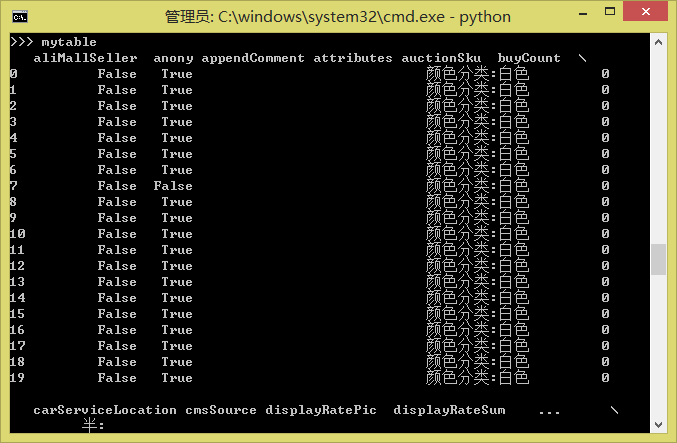 mytable1
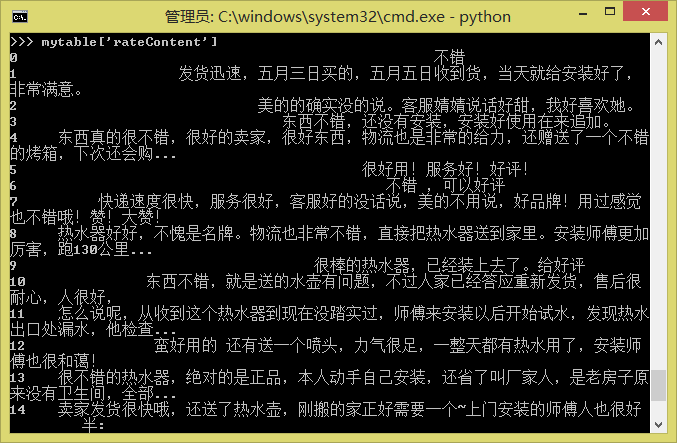 mytable2
If you have two tables, mytable1 and mytable2, that need to be merged, you just need:
pd.concat([mytable1, mytable2], ignore_index=True)
And so on. For more operations, please refer to the Pandas tutorial.
Finally, to save the reviews as a txt or Excel file (since there can be issues with Chinese character encoding, saving as txt may run into errors, so it might be better to save as Excel — Pandas can also read Excel files):
mytable.to_csv('mytable.txt')
mytable.to_excel('mytable.xls')
A few conclusions
Let's see how many lines of code we ended up using in total:
import requests as rq
import re
import pandas as pd
url='http://rate.tmall.com/list_detail_rate.htm?itemId=41464129793&sellerId=1652490016¤tPage=1'
myweb = rq.get(url)
myjson = re.findall('\"rateList\":(\[.*?\])\,\"tags\"',myweb.text)[0]
mytable = pd.read_json(myjson)mytable.to_csv('mytable.txt')
mytable.to_excel('mytable.xls')
Nine lines! In fewer than ten lines, we've built a simple crawler program capable of scraping data from Tmall! Feeling tempted to try it yourself?
Of course, this is just a simple example. To make it truly practical, you'd need to add a few more features, such as figuring out how many pages of reviews there are in total and reading through them page by page. Batch-fetching product IDs is another thing you'd want to implement. These are left for you to work out on your own — none of them are particularly hard problems. This post is only meant to serve as a starting point, offering the simplest possible guide for readers who need to crawl data.
The hardest problem of all is probably that after large-scale scraping, Tmall's own system might detect you and start requiring a CAPTCHA before you can continue accessing the site — that's a much more complicated situation to deal with. Possible solutions include using proxies, increasing the interval between scraping requests, or using OCR to recognize the CAPTCHA directly, among others. I don't have a particularly good solution for this myself either.
Translated automatically with claude-sonnet-5; all equations are reproduced verbatim from the source. Copyright remains with the original author.