Making MathJax Play Nicer with Google Translate and Lazy Loading
Quite a while ago, readers already asked for math formulas to be rendered on Cool Papers, because many math-heavy papers have LaTeX code right in their titles or abstracts. If these formulas aren't rendered properly, they just look like a pile of garbled text, which really hurts the reading experience. However, earlier tests showed that MathJax, which is responsible for rendering the formulas, doesn't play well with either Google Translate or lazy loading. So even though this request had been around for a long time, I never got around to adding it.
The good news is that after a lot of digging and debugging over the past couple of days, I've finally solved the compatibility issues, so Cool Papers can now render math formulas. This post summarizes the solution for anyone who's interested.
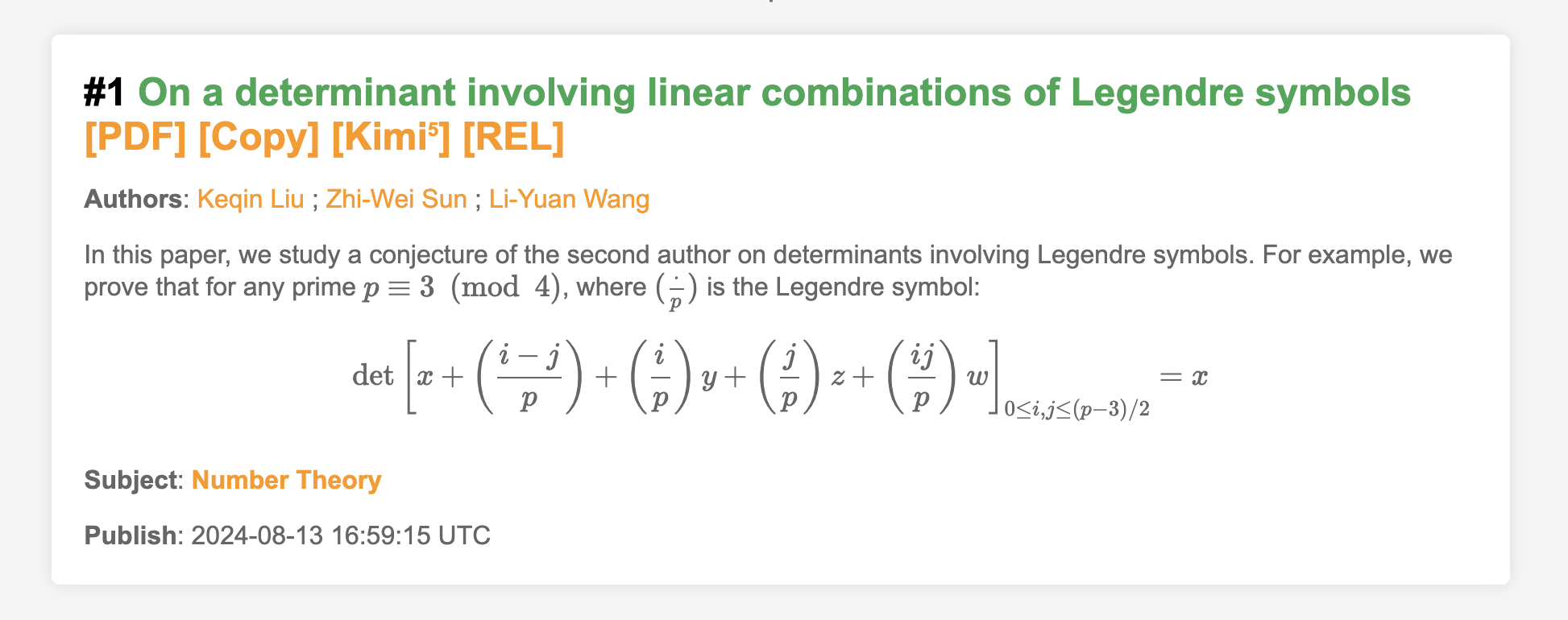 Paper abstract containing formulasmore
Formula Rendering
When it comes to displaying math formulas (LaTeX) on a web page, there are currently two mainstream options: MathJax and KaTeX. KaTeX is relatively more lightweight, but its LaTeX support isn't as comprehensive as MathJax's. Since this blog has always used MathJax, when I considered adding formula support to Cool Papers, MathJax was also my first choice.
Similar to Python, MathJax 3.x and 2.x are two quite different systems (the latest version is 3.2.2, and 4.0 is already in testing). Most of the MathJax-related resources you can find these days are for version 2.x, so I went with the latest 2.x release, 2.7.9, for Cool Papers (this is also the version used on this blog; incidentally, arXiv's official site also uses MathJax, specifically version 2.7.3).
For an ordinary web page, adding formula rendering isn't hard — you just need to add two snippets of code to the page. Here's the reference code I use on this blog:
<script type="text/x-mathjax-config">
    MathJax.Hub.Config({
        tex2jax: {inlineMath: [['$','$'], ['\\(','\\)']]},
        TeX: {equationNumbers: {autoNumber: ["AMS"], useLabelIds: true}, extensions: ["AMSmath.js", "AMSsymbols.js", "extpfeil.js"]},
        "HTML-CSS": {linebreaks: {automatic: true, width: "95% container"}, noReflows: false, availableFonts: ["tex"], styles: {".MathJax_Display": {margin: "1em 0em 0.7em;", display: "inline-block!important;"}}},
        "CommonHTML": {linebreaks: {automatic: true, width: "95% container"}, noReflows: false, availableFonts: ["tex"], styles: {".MJXc-display": {margin: "1em 0em 0.7em;", display: "inline-block!important;"}}},
        "SVG": {linebreaks: {automatic: true, width: "95% container"}, styles: {".MathJax_SVG_Display": {margin: "1em 0em 0.7em;", display: "inline-block!important;"}}},
        "PreviewHTML": {linebreaks: {automatic: true, width: "95% container"}}
    });
</script>
<script src="/static/MathJax-2.7.9/MathJax.js?config=TeX-AMS-MML_HTMLorMML"></script>
The Pain of Translation
The code above works fine for ordinary use cases — it successfully converts LaTeX code into math formulas that can be displayed on a web page. But for Cool Papers, it ran into two "roadblocks": page translation and lazy loading. In this section, let's first tackle the first roadblock — page translation, which here mainly refers to Chrome's built-in Google Translate.
As everyone knows, the whole point of Cool Papers is to skim through papers, and paper titles and abstracts are in English. For those of us who are native Chinese speakers, we often turn on page translation to speed up reading. Sure, some readers might "look down on" this and insist that reading the original English is more accurate, but there's no denying that the demand for page translation is real. And for the goal of "skimming papers," even machine-translated Chinese is often good enough.
However, for a page containing MathJax-rendered math formulas, the result after Google Translate is downright unrecognizable — practically garbled to the point of being unreadable. Readers can try this themselves by finding a paper with formulas on arXiv — for instance, here's what happens with 2408.07010:
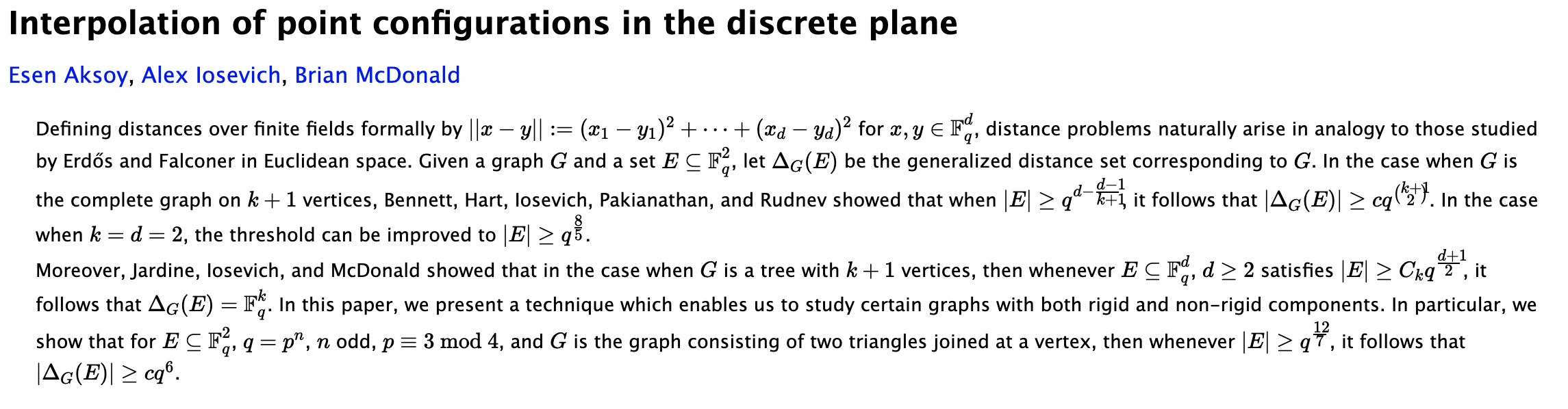 Page with formulas before translation
 Page with formulas after translation
An Immunity Pass
The idea for solving this problem is to give the formulas an "immunity pass" — that is, to make sure they don't get translated. After some searching, I found there are two ways to tell Google Translate not to translate a given element: one is to add a class name class="notranslate" to the element, and the other is to add an attribute translate="no" to the element. There are also two ways to add these: on the backend, meaning the page content is modified before it's sent out from the server, or on the frontend, meaning the content is modified with JS after the browser has already received the page.
For MathJax, since it renders math formulas in real time on the frontend, the backend never touches the rendered formulas, so we can only go with the frontend approach. Through testing, I found that MathJax adds a class name of MathJax to rendered formulas, so we can use this class name to select all the formulas and then use JS to append class="notranslate" to them. Here's the reference code:
document.querySelectorAll('.MathJax').forEach(element => element.classList.add('notranslate'));
Note, though, that this code only works if it's run after all math formulas have finished rendering. How do we guarantee that all formulas have finished rendering? The most reliable approach is to place this code into MathJax's Queue (see here):
<script type="text/x-mathjax-config">
    MathJax.Hub.Config({
        tex2jax: {inlineMath: [['$','$'], ['\\(','\\)']]},
        TeX: {equationNumbers: {autoNumber: ["AMS"], useLabelIds: true}, extensions: ["AMSmath.js", "AMSsymbols.js", "extpfeil.js"]},
        "HTML-CSS": {linebreaks: {automatic: true, width: "95% container"}, noReflows: false, availableFonts: ["tex"], styles: {".MathJax_Display": {margin: "1em 0em 0.7em;", display: "inline-block!important;"}}},
        "CommonHTML": {linebreaks: {automatic: true, width: "95% container"}, noReflows: false, availableFonts: ["tex"], styles: {".MJXc-display": {margin: "1em 0em 0.7em;", display: "inline-block!important;"}}},
        "SVG": {linebreaks: {automatic: true, width: "95% container"}, styles: {".MathJax_SVG_Display": {margin: "1em 0em 0.7em;", display: "inline-block!important;"}}},
        "PreviewHTML": {linebreaks: {automatic: true, width: "95% container"}}
    });
    MathJax.Hub.Queue(function() {
        document.querySelectorAll('.MathJax').forEach(element => element.classList.add('notranslate'));
    });
</script>
<script src="/static/MathJax-2.7.9/MathJax.js?config=TeX-AMS-MML_HTMLorMML"></script>
What this does is let MathJax itself run the function defined in MathJax.Hub.Queue only after it has confirmed that formula rendering is complete. With this in place, if you turn on Google Translate after the formulas have finished rendering, the formulas won't get translated.
Lazy Loading
The second "roadblock" for MathJax is lazy loading. On the Cool Papers list page, since the number of papers to display could be quite large (hundreds or even thousands), not all of them are loaded at once when the page first opens. Instead, only the first 25 are shown, and more batches of 25 are loaded only as the user scrolls near the bottom. This speeds up the initial load without noticeably hurting the user experience — this is lazy loading.
Many content-heavy sites use lazy loading; it's a fairly mature technique. But for MathJax, it only renders the formulas present when the page is first opened — formulas in content loaded later via lazy loading won't be rendered automatically, so we need to manually trigger rendering after each lazy load. This part isn't too hard. The function to manually trigger rendering is MathJax.Hub.Typeset, and we just need to call it right after the lazy-loading function, something like:
loadMorePapers();
MathJax.Hub.Typeset();
Note that plain MathJax.Hub.Typeset doesn't include the step of appending notranslate to the formulas. To add that step too, we need to change it to:
loadMorePapers();
MathJax.Hub.Queue(
    ['Typeset', MathJax.Hub],
    function() {
        document.querySelectorAll('.MathJax').forEach(element => element.classList.add('notranslate'));
    }
);
Double Trouble
Above, we separately solved the compatibility issues between MathJax and Google Translate, and between MathJax and lazy loading. However, when Google Translate and lazy loading occur together, a new problem shows up.
Suppose we turn on Google Translate right when we open the page. Then, as we scroll close to the bottom, new papers get lazy-loaded in, and Google Translate gets triggered again, translating the newly loaded papers as well. If we've also set up the manual formula-rendering code from the previous section, MathJax will render those formulas too. Since Google Translate and MathJax fire at roughly the same time, but class="notranslate" only gets appended to the formulas after rendering finishes — in other words, by the time translation starts, the formulas haven't had class="notranslate" added yet — the formulas end up getting translated after all.
To fix this, we need some way to guarantee that Google Translate only runs after the formulas have finished rendering and had class="notranslate" added. But since Google Translate is built into Chrome, there's no way for a website to control the browser's behavior directly. It seems like a dead end — but through testing, I discovered that Google Translate constantly monitors changes to the page to decide whether to trigger a new round of translation. Based on this property, we can try some "reverse thinking."
What does that "reverse" approach look like? We know that, for Cool Papers, the only things that need translating are the paper titles and abstracts. So we can add class="notranslate" to them right from the start. Once this is added, Google Translate won't try to translate them, whether on the initial page load or after lazy loading. Then, once the formulas have finished rendering, we remove the class="notranslate" from the titles and abstracts. At that point, the browser will recognize that the titles and abstracts are translatable content, and translation will be triggered.
This way, we successfully ensure that translation only fires after formula rendering is complete. Here's the reference code:
loadMorePapers();
MathJax.Hub.Queue(
    ['Typeset', MathJax.Hub],
    function() {
        document.querySelectorAll('.MathJax').forEach(element => element.classList.add('notranslate'));
        document.querySelectorAll('a.title-link, p.summary').forEach(element => element.classList.remove('notranslate'));
    }
);
Summary
Finally, let's summarize our solution. If your website needs to display math formulas, has lazy loading, and needs to support users' page-translation features, you can follow these steps to achieve maximum compatibility:
- Add
class="notranslate"to every content block that contains formulas;
- Load MathJax as follows (where "a.title-link" and "p.summary" are among the class names of the blocks containing math formulas):
<script type="text/x-mathjax-config">
    MathJax.Hub.Config({
        tex2jax: {inlineMath: [['$','$'], ['\\(','\\)']]},
        TeX: {equationNumbers: {autoNumber: ["AMS"], useLabelIds: true}, extensions: ["AMSmath.js", "AMSsymbols.js", "extpfeil.js"]},
        "HTML-CSS": {linebreaks: {automatic: true, width: "95% container"}, noReflows: false, availableFonts: ["tex"], styles: {".MathJax_Display": {margin: "1em 0em 0.7em;", display: "inline-block!important;"}}},
        "CommonHTML": {linebreaks: {automatic: true, width: "95% container"}, noReflows: false, availableFonts: ["tex"], styles: {".MJXc-display": {margin: "1em 0em 0.7em;", display: "inline-block!important;"}}},
        "SVG": {linebreaks: {automatic: true, width: "95% container"}, styles: {".MathJax_SVG_Display": {margin: "1em 0em 0.7em;", display: "inline-block!important;"}}},
        "PreviewHTML": {linebreaks: {automatic: true, width: "95% container"}}
    });
    MathJax.Hub.Queue(function() {
        document.querySelectorAll('.MathJax').forEach(element => element.classList.add('notranslate'));
        document.querySelectorAll('a.title-link, p.summary').forEach(element => element.classList.remove('notranslate'));
    });
</script>
<script src="/static/MathJax-2.7.9/MathJax.js?config=TeX-AMS-MML_HTMLorMML"></script>
- Add the following code right after the lazy-loading code:
MathJax.Hub.Queue(
    ['Typeset', MathJax.Hub],
    function() {
        document.querySelectorAll('.MathJax').forEach(element => element.classList.add('notranslate'));
        document.querySelectorAll('a.title-link, p.summary').forEach(element => element.classList.remove('notranslate'));
    }
);
You're welcome to try it out yourself on Cool Papers. I've tested this solution on both Chrome and Safari, and it works with Chrome's built-in translation, Safari's built-in translation, and Cool Papers' own translation feature.
Translated automatically with claude-sonnet-5; all equations are reproduced verbatim from the source. Copyright remains with the original author.